

- You are here:
- Home »
- Smart Fitness Watches »
- Fitness Watch with Heart Rate Monitor Activity and Sleeping Tracker,HD Display Smart Watch Compatible with Apple iPhone Samsung Sony HTC LG Huawei Andriod Smartphones by Pandaoo(Black)
Fitness Watch with Heart Rate Monitor Activity and Sleeping Tracker,HD Display Smart Watch Compatible with Apple iPhone Samsung Sony HTC LG Huawei Andriod Smartphones by Pandaoo(Black)
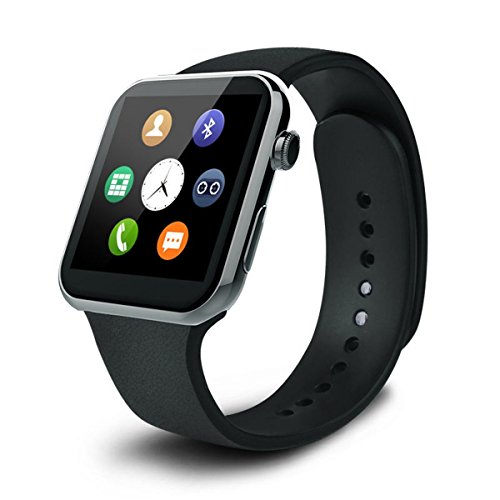
Product Description
Specification
CPU: MTK2502A
Screen size: 1.54 inch
Resolution: 240×240 pixels
BluetoothVersion:Bluetooth V4.0
Size: 40*46.5*9.8mm
Battery capacity: 3.7V/260mAh
Weight: 263g
Color: Gold
Main Functions
Bluetooth Message
Bluetooth phone call
Heart Rate Monitor
Pedometer
Music Playing
Remote Capture
Sedentary Reminder
Dual Interface DIY Switch
Package Content
1x Smart Watch
1x User Manual
1x Retail Box
1x USB Charger Cable
Kindly Reminder
1.This watch has no camera,but after connecting your phone, you can remote the camera of your phone
2.This watch support connecting with smart phone by bluetooth,so there is no memory card socket
How to connect SmartPhones.
Step 1:Install APP on your smartphone first.
For iphone, Go to Apple Store to download App “”Mediatek Smartdevice”” to your iphone,the Short link:http://alturl.com/9f2d9 ;
For Android phone, just click “”Quick Response”” in the watch and scan the code to download App “”Mediatek Smartdevice””, the short link for google play£ºhttp://alturl.com/23mh5.
Step 2: Switch on Bluetooth on Smart Phone and Smartwatch.
Step 3: Choose “”BT settings”” in “”Setting”” app, please make sure the “”Power”” option is “”on””. Step 4: Open the “”BT connection”” APP, and click “”search new device”” to do searching, click on the target device to do “”paring””,just lick “”Pair”” on your phone, then you will have connection done.”
Product Features
- Heart Rate Monitor: Monitor your heart rate all the time,rate result display immediately, Two measureing way “Once” or “Repeat” can be switched, The “Once” monitor heart rate in few second and display rate number after. and “Repeat” means monitor your heart rate continuously and display result with dynamic curve in HD display(240×240 pixels).
- Fitness tracker: Heart beat, daily movement,sleeping tracking and timer remind you to have a rest.
- Hands Free to make phone calls & answers, reading the message, remind you missing calls & messages when connect to Smartphones with Bluetooth.
- More Features:Anti-Lost,Remote camera Control work with Smartphones
- Mate for Samsung S3/S4/S5/Note 2/Note 3/Note 4 HTC Sony LG and iPhone 4S/5/5C/5S/6/6 Plus,Easy Connect and communicate with the smartphone through Bluetooth.